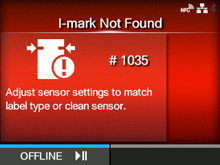
CL-NX Error Message:1035 (I-mark not found) Miho 16 May 2026 09:50 Updated When there is an error with the product, the error message appears on the screen. Check the cause and countermeasure, and then take appropriate action. To clear the error: Press the button (OFFLINE) or open/close the print head. Cause and Countermeasure Reference Cause (1) Meandering media. Countermeasure (1) Load the media correctly. Loading the Media Cause (2) A label is attached to the media sensor. Countermeasure (2) Clean the media sensor. Cleaning Using the Cleaning Kit Cause (3) The media sensor type is incorrect. Countermeasure (3) Set the media sensor type which is compatible with the media you use. Media Sensor Type Cause (4) The media sensor level is incorrect. Countermeasure (4) Adjust the media sensor level. Calibrate [01-00040-EN]
 button (OFFLINE) or open/close the print head.