
Make sure that the printer is powered off and disconnect the power cord from the AC outlet.
Remove the label by turning the platen roller manually.
After removing the labels, please clean the media route, especially the platen roller.
In case the platen roller cannot turn by hand, please remove the platen roller from the printer and clean it.
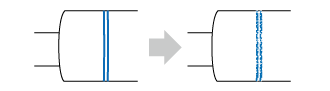
The platen roller has a striped marking on the left side. When the striped marking started to fade off, it indicates that you should replace the platen roller.
|
|
View the video below for the procedure.
Please click here for the web manual.
[01-00039-EN]