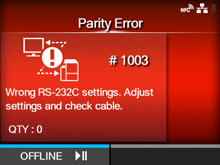
CL-NX Error Message 1003 (Parity Error) Miho 15 May 2026 14:03 Updated When there is an error with the product, the error message appears on the screen. Check the cause and countermeasure, and then take appropriate action. To clear the error: Press thebutton (OFFLINE) orbutton, or adjust the settings. Cause and Countermeasure Reference Cause (1) RS-232C settings are incorrect. Countermeasure (1) Set the interface settings of the product again. RS-232C Cause (2) The RS-232C cable is not connected correctly. Countermeasure (2) Power off the product, connect the RS-232C cable correctly, and then power on the product again. Powering On/Off the Product RS-232C Interface Connection (Standard) Contact your SATO technical support if the error cannot be resolved.[01-01281-EN]
 button (OFFLINE) or
 button, or adjust the settings.