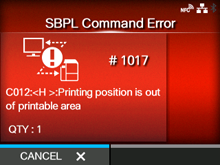
When there is an error with the product, the error message appears on the screen.
Check the cause and countermeasure, and then take appropriate action.
Press the

button (CANCEL) or

button.
|
|
|
Incorrect command or parameter in the print data.
For details about the error, check the "Caaa: <bb>: cc" part below the error number.
|
◦
|
Caaa: position of error occurrence
|
If the error is not solved, power on the product again.
|
|
|
•
|
The command error appears when [Show Error]in [SBPL]under the [Applications]menu is set to [Enabled].
|
|
|
|
Contact your SATO technical support if the error cannot be resolved.
How to See the Command Error Information
|
•
|
Location of error occurrence
|
"Caaa" in the command error message shows the location of command error.
The number of ESC commands from start code <A> command is shown in "aaa".
Note that the start code <A> command is not included in the number of ESC commands, which can be shown up to 999.
When a command error is detected by the Horizontal Print Position <H> command.
In this case, C002 is the location of the error.
The command name is shown in "<bb>". Error is detected in the command name.
|
◦
|
A one-byte command name is left aligned
|
The cause of command error appears in "cc" in the error message ("Caaa:<bb>:cc").
|
|
|
|
|
Analyzed improper command.
|
|
|
Received improper parameter.
|
|
|
Failed to read the command table.
|
Invalid graphic data/custom designed data
|
Analyzed improper graphic and custom designed data.
|
Invalid registration area
|
|
•
|
Specified memory area (card slot) is inappropriate.
|
|
•
|
Tried to write to a write-protected media.
|
|
This number is already registered.
|
Number specified by registration command has already been taken.
|
Over registration area limit
|
Exceeded the registration area. (Memory full)
|
|
|
Data, such as form overlay, is not registered.
|
Printing position is out of printable area
|
The specified print start position is outside the printable area.
|
Barcode image is out of printable area
|
The printing image is outside the printable area. (Barcode only)
|
[01-01428-EN]