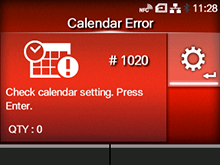
CL-NX Error Message 1020 (Calendar Error) Miho 15 May 2026 14:03 Updated When there is an error with the product, the error message appears on the screen. Check the cause and countermeasure, and then take appropriate action. To clear the error: Change the calendar(option)settings, press thebutton (OFFLINE) orbutton, or power off the product. Cause and Countermeasure Reference Cause (1) The date and time of the calendar are incorrect. Countermeasure (1) Set the calendar again. Regional Cause (2) The battery for the calendar is running low. Countermeasure (2) The battery for the calendar needs to be changed. Contact your SATO technical support. Contact Information for When You Are in Trouble [01-01431-EN]
 button (OFFLINE) or
 button, or power off the product.