When there is an error with the product, the error message appears on the screen.
Check the cause and countermeasure, and then take appropriate action.
To clear the error:
Power off the product, or change print head check conditions.
To forcibly clear the head error and resume printing, press and hold thebutton (DISMISS) until the progress bar on the blue line of the button reaches to the right end.
Cause and Countermeasure
Reference
Cause (1)
The print elements are worn out.
Countermeasure (1)
Power off the product, or change the print head check conditions to only check for missing elements in barcodes and try to adjust missing elements to white bars.

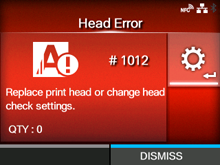
 button (DISMISS) until the progress bar on the blue line of the button reaches to the right end.