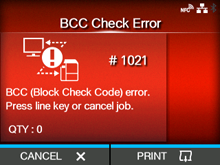
CL-NX Error Message 1021 (BCC Check Error) Miho 16 May 2026 09:56 Updated When there is an error with the product, the error message appears on the screen. Check the cause and countermeasure, and then take appropriate action. To clear the error: Press thebutton (CANCEL) orbutton. Cause and Countermeasure Cause The BCC code of the transmitted data (one item) is incorrect. Countermeasure Check the transmitted data and interface settings. ◦ [PRINT]: Continue printing from the print data where the BCC error occurred. ◦ [CANCEL]: Cancel the print data where the BCC error occurred and continue printing from the next item. ◦ Send the SUB command: Clear the BCC error and continue printing from where it stopped. ◦ Send the CAN command: Cancel the print data where the BCC error occurred and continue printing from the next item. [01-01445-EN]
 button (CANCEL) or
 button.