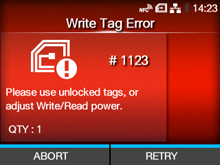
CL-NX Error Message 1123 (Write Tag Error) Nobutaka Kobayashi 16 May 2026 09:56 Updated When there is an error with the product, the error message appears on the screen. Check the cause and countermeasure, and then take appropriate action. To clear the error: Press the button (RETRY), and then execute the retry/release operation set in [Retry Mode], or press the button (ABORT). Retry Mode To cancel an entire print job, open and close the top cover to switch the product to Offline mode, and then press the button (CANCEL). Cause and Countermeasure Reference UHF only Cause (1) Tried to write to an inlay that was write-locked. Countermeasure (1) Use tags that are not locked. - UHF only Cause (2) Tried to write to an inlay when the writing power is low. Countermeasure (2) Adjust [Write Power]/[Read Power]. Write Power Read Power [01-01478-EN]

 button (RETRY), and then execute the retry/release operation set in
  button (ABORT).