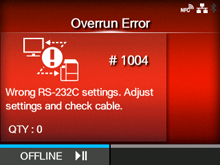
CL-NX Error Message 1004 (Overrun Error) Miho 15 May 2026 14:03 Updated Applicable models: CL4NX/6NXPlease refer to the below. When there is an error with the product, the error message appears on the screen. Check the cause and countermeasure, and then take appropriate action. To clear the error: Press thebutton (OFFLINE) orbutton, or adjust the settings. Cause and Countermeasure Reference Cause (1) RS-232C settings are incorrect. Countermeasure (1) Set the interface settings of the product again. RS-232C Cause (2) The RS-232C cable is not connected correctly. Countermeasure (2) Power off the product, connect the RS-232C cable correctly, and then power on the product again. Powering On/Off the Product RS-232C Interface Connection (Standard) Contact your SATO technical support if the error cannot be resolved.[01-01288-EN]
 button (OFFLINE) or
 button, or adjust the settings.