View the video below for the procedure.
|
|
|
•
|
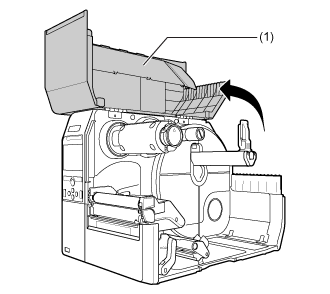
Open the top cover fully to prevent accidental drop of the cover.
|
|
|
2.
|
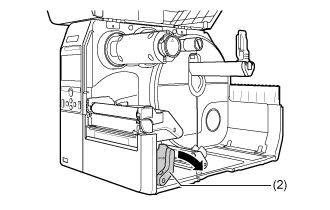
Push the head lock lever (2) towards the rear.
|
|
3.
|
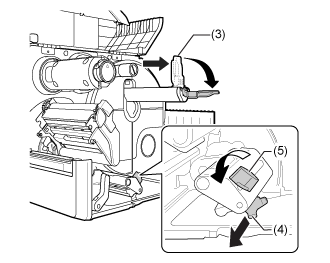
Pull the media holder guide (3) and media guide (4) away from the product.
|
Turn the knob (5) counterclockwise to release the media guide.
|
4.
|
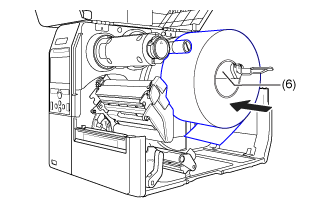
Load the media in the media holder (6).
|
Make sure that the media roll is all the way in towards the inside of the product.
|
5.
|
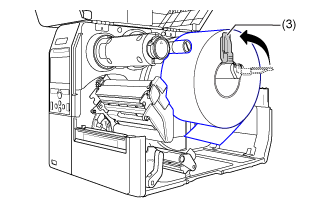
Push the media holder guide (3) lightly against the media roll.
|
|
6.
|
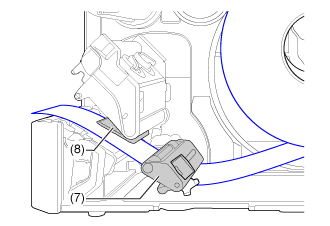
Pass the media below the media damper (7) and the media sensor guide (8) while pushing the media to inside of the product.
|
Make sure that the end of the media extends out the front of the product.
|
7.
|
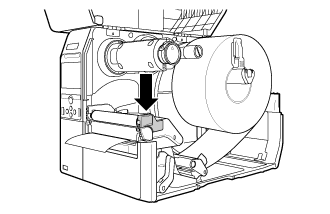
Press the print head down until the head lock lever is locked.
|
|
8.
|
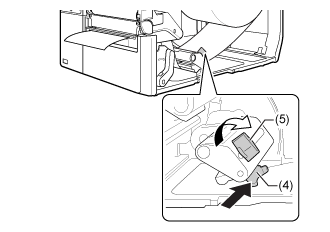
Press the media guide (4) lightly against the end of the media, and turn the knob (5) to lock the media guide.
|
|
|
|
•
|
When closing the top cover, be careful not to pinch your fingers.
|
|
|
10.
|
Press the button (FEED) in Offline mode to feed the media. button (FEED) in Offline mode to feed the media.
|
|
11.
|
Press the button (ONLINE) to change to Online mode. button (ONLINE) to change to Online mode.
|
|
|
|
•
|
You need to load the ribbon when printing using thermal transfer.
|
|