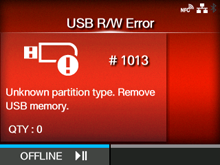
CL-NX Error Message 1013 (USB R/W Error) Miho 16 May 2026 09:56 Updated When there is an error with the product, the error message appears on the screen. Check the cause and countermeasure, and then take appropriate action. To clear the error: Connect the USB memory and then disconnect it, or press thebutton (OFFLINE) or thebutton. Cause and Countermeasure Cause (1) The USB memory is disconnected while writing. Countermeasure (1) Connect the USB memory. Cause (2) The copy area in the USB memory is not sufficient. Countermeasure (2) Make sure that the USB memory has sufficient copy area. Cause(3) Writing to the USB memory fails. Countermeasure(3) Replace the USB memory. Cause (4) The USB memory is not formatted. Countermeasure (4) Format the USB memory to FAT32 format. [01-01423-EN]
 button (OFFLINE) or the
 button.