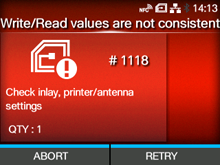
When there is an error with the product, the error message appears on the screen.
Check the cause and countermeasure, and then take appropriate action.
Press the

button (RETRY), and then execute the retry/release operation set in
[Retry Mode], or press the

button (ABORT).
To cancel an entire print job, open and close the top cover to switch the product to Offline mode, and then press the
button (CANCEL).
|
|
|
The written value and read value do not match.
Confirm the inlay and check the product and antenna settings.
|
|
The written value and read value do not match. A value greater than original data was written to subtraction register.
Write an appropriate value to subtraction register.
|
|
Contact your SATO technical support if the error cannot be resolved.
|
|
|
•
|
You cannot use an RFID tag that has caused an RFID tag error. An error message is printed on the RFID tag that caused the error.
|
|
[01-01512-EN]