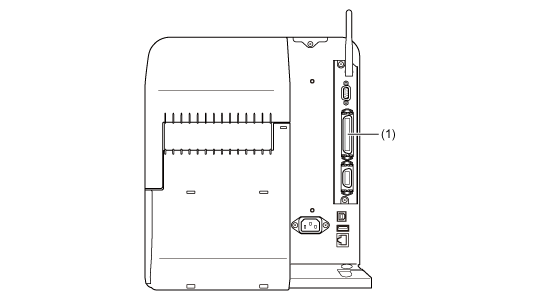
Connect the interface cable when the product is powered off.
Connect the IEEE1284-compliant cable to the IEEE1284 connector (1) of the product.
•
If the product is powered on without installing the printer driver, Windows' Plug & Play runs. When you use the printer driver, do not power on the product while the cable is connected, until instructed in the procedure for installing the printer driver.
•
Be sure to use the recommended IEEE1284-compliant cable. If you use cables other than the IEEE1284-compliant cable, your data may become corrupt.
•
IEEE1284-compliant: compatible mode, ECP mode, and nibble mode are supported.
•
Some computers may not support ECP mode.
•
ECP mode is configured in the BIOS settings of the computer. Some computers may use the software tools for Windows.
•
Some computer models may not perform ECP operations even if they are set to ECP mode. Contact the computer manufacturer.
•
Printing using the USB parallel conversion cable is not guaranteed. Also, no support for the connection procedure is provided.