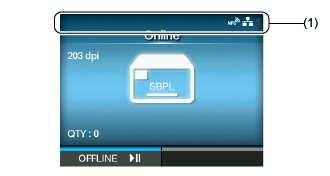
|
|
|
|
|
Bluetooth is enabled but not connected.
|
|
|
Bluetooth is enabled and connected.
|
|
|
Network link is enabled but not connected.
|
|
|
Network link is enabled and connected.
|
|
|
NFC is enabled but not connected.
|
|
|
NFC is enabled and connected.
|
|
|
Not connected to the NTP time server.
|
|
|
Wi-Fi is authenticated, but not connected.
|
|
|
|
|
|
|
|
|
|
|
|
|
|
|
Wi-Fi Direct is not connected.
|
|
|
Wi-Fi Direct is connected.
|
|
|
Wi-Fi Direct is connected.
|
|
|
Wi-Fi Direct is connected.
|
|
|
Wi-Fi Direct is connected or the product is set to act as an access point.
|
|
|
Product is connected to USB host.
|
|
|
Waiting for external input/output signal.
|
|
|
RFID mode is enabled.(CL4NXonly)
|
|
|
RFID mode is enabled, but the system is defective.(CL4NXonly)
|
|
|
Standard code is disabled.
|
|
|
The On-Demand mode of the SOS (SATO Online Services) is enabled.
|
|
|
The Real Time mode or the Light mode of the SOS is enabled. The product is connected to the SOS cloud.
|
|
|
The Real Time mode or the Light mode of the SOS is enabled, but not connected to the SOS cloud.
If the LAN or Wi-Fi icon is grayed out, the product is not connected to the network.
If the LAN or Wi-Fi icon is active, the Internet connection of the SOS cloud has a trouble.
|
|
|
The product is not connected to the SOS cloud.
|
|
|
Time period set for periodic notification for On-Demand mode for SOS has been reached. Scan the QR code and send the information to the SOS cloud.
|
|
|
IP address could not be acquired. Or a communication error has occurred.
|