Press the/buttons to highlight the item that you want to change, and press the/buttons to change the pin No.
Press thebutton to save the settings and return to the[Signals]menu.
The setting items are as follows:
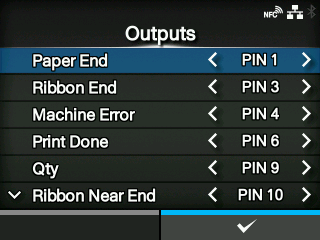
Paper End
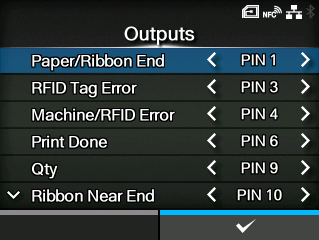
Paper/Ribbon End(If RFID mode is enabled) (CL4NXonly)
Assign the pin No. for the Paper End signal output.
Assign the pin No. for the Paper/Ribbon End signal output if you have installed the RFID.
Ribbon End
RFID Tag Error(If RFID mode is enabled) (CL4NXonly)
Assign the pin No. for the Ribbon End signal output.
Assign the pin No. for the RFID Tag Error signal output if you have installed the RFID.
Machine Error
Machine/RFID Error(If RFID mode is enabled) (CL4NXonly)
Assign the pin No. for the Machine Error signal output.
Assign the pin No. for the Machine/RFID Error signal output if you have installed the RFID.
Print Done
Assign the pin No. for the Print Done signal output.
Qty
Offline
[Qty]is shown if[MODE1]is selected in the[EXT 9PIN]menu.
[Offline]is shown if[MODE2]is selected in the[EXT 9PIN]menu.
Assign the pin No. for the Qty/Offline signal output.
Ribbon Near End
Assign the pin No. for the Ribbon Near End signal output.
Dispenser
Assign the pin No. for the Dispenser signal output.
◦
Use this signal to connect the dispenser unit or linerless cutter kit (CL4NXonly).
Label Near End
Assign the pin No. for the Label Near End signal output.
*This feature is supported on products from serial number 6B~ and above.
The options for each signal output are as follows:
[PIN 1]
Set the selected signal to pin 1.
[PIN 3]
Set the selected signal to pin 3.
[PIN 4]
Set the selected signal to pin 4.
[PIN 6]
Set the selected signal to pin 6.
[PIN 9]
Set the selected signal to pin 9.
[PIN 10]
Set the selected signal to pin 10.
[OFF]
Set the selected signal to off mode.
•
You cannot set any outputs using the same pin number. If you attempt to set the same number, the settings will be shown in red and you cannot save the settings.

 /
/ buttons to highlight the item that you want to change, and press the
 /
/ buttons to change the pin No.
 button to save the settings and return to the