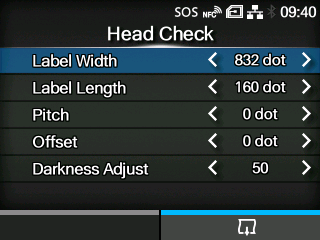
Perform the head check print.
|
1.
|
Check and set the items as listed on the [Head Check]menu.
|
|
2.
|
Press the  button to start the head check print. Press the button again to pause the print.
|
To stop the head check print, first pause the print and then press the

button.
The setting items are as follows:
Set the media width used for the head check print.
The setting range varies depending on the print resolution of the product.
The setting range is as follows:
|
|
|
If [Head Base Position]is [Standard]
|
If [Head Base Position]is [Left-justify]
|
(1 dot = 0.125 mm (0.0049"))
|
|
|
|
(1 dot = 0.083 mm (0.0033"))
|
|
|
|
(1 dot = 0.042 mm (0.0017"))
|
|
|
|
Set the length of one piece of the media used for the head check print.
The setting range varies depending on the print resolution of the product.
The setting range is as follows:
|
|
|
|
(1 dot = 0.125 mm (0.0049"))
|
|
|
(1 dot = 0.083 mm (0.0033"))
|
|
|
(1 dot = 0.042 mm (0.0017"))
|
|
|
Set the print position in the vertical direction.
The setting range varies depending on the print resolution of the product.
The setting range is as follows:
|
|
|
|
(1 dot = 0.125 mm (0.0049"))
|
|
|
(1 dot = 0.083 mm (0.0033"))
|
|
|
(1 dot = 0.042 mm (0.0017"))
|
|
|
When you decrease the setting value, the print position moves in the feed direction (toward the front part of the media).
When you increase the setting value, the print position moves opposite the feed direction (toward the end part of the media).
Set the stop position of the media.
The setting range varies depending on the print resolution of the product.
The setting range is as follows:
|
|
|
|
(1 dot = 0.125 mm (0.0049"))
|
|
|
(1 dot = 0.083 mm (0.0033"))
|
|
|
(1 dot = 0.042 mm (0.0017"))
|
|
|
When you decrease the setting value, the stop position moves in the feed direction (toward the front part of the media).
When you increase the setting value, the stop position moves opposite the feed direction (toward the end part of the media).
Fine tune the print darkness of the head check print.
The setting range is from 0 to 99.
0 is the lightest and 99 is the darkest.
|
|
|
•
|
The value of [Label Length], [Pitch], [Offset]and [Darkness Adjust]set in the [Head Check]menu will be reflected to the same item settings in the [Factory]menu, [Configure List]menu, [Configure QR]menu and [Paper Sensor]menu.
|
|
[02-01522-EN]