The barcode check function does a reading check of a barcode printed by this product to prevent the distribution of labels with defective barcodes. You can use this function by installing the supported barcode checkers to the product.
The basic specifications of the barcode check function are as follows:
|
|
|
Supported Barcode Checkers
|
|
•
|
Made by IDEC/DATALOGIC (USB connection)
|
|
◦
|
WB1F-100S1S (for 1D barcodes)
|
|
◦
|
GFS4170 (for 1D barcodes)
|
|
◦
|
GFS4470 (for 1D barcodes/2D codes)
|
|
•
|
Made by KEYENCE (RS-232C connection)
|
|
◦
|
BL-1301 (for 1D barcodes)
|
|
◦
|
SR-710 (for 1D barcodes/2D codes)
|
Refer to the manual of the barcode checker for its settings and supported barcodes.
|
|
|
SBPL/SZPL/SIPL/STCL/SDPL/SEPL
|
|
|
Continuous/Cutter/Cut & Print/Dispenser/Linerless ( CL4NXonly)
|
|
|
•
|
Not available in Tear-Off mode.
|
|
•
|
Not available for CL4NXRFID models.
|
|
•
|
The Void Print function is not available in Dispenser/Linerless ( CL4NXonly) mode.
|
|
|
Print Speed/Print Darkness
|
The optimal print speed and print darkness for secure reading vary depending on various conditions, such as the barcode type and label layout. Be sure to perform a test read carefully and determine the settings.
|
|
|
Same as the product specifications. However, there are following restrictions:
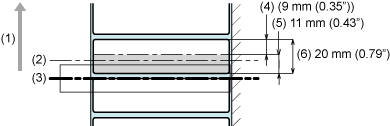
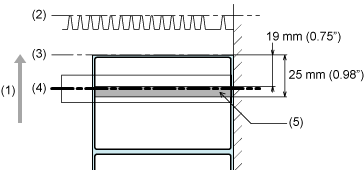
Barcodes printed within the range of 11 mm (0.43") from the trailing end of the label cannot be read because it is blocked by the print head and ribbon adjustment plate.
(2) Ribbon adjustment plate
(4) Readable area (for the minimum media pitch)
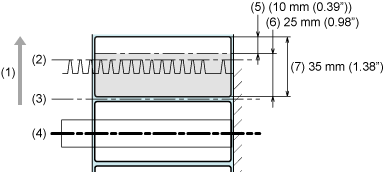
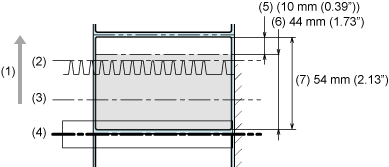
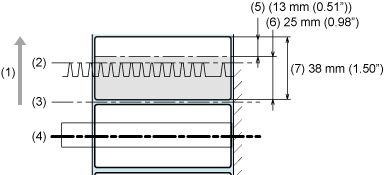
Barcodes printed within the following area cannot be read because it is blocked by the cutter cover.
|
◦
|
Cutter (cutting every label): 25 mm (0.98") from the trailing end of the label
|
(5) Readable area (for the minimum media pitch)
|
◦
|
Cutter (cutting according to the specified number of labels)/ Cut & Print: 44 mm (1.73") from the trailing end of the label
|
(5) Readable area (for the minimum media pitch)
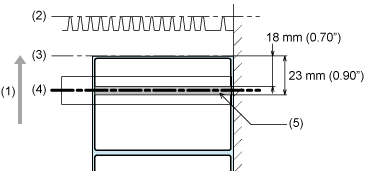
Do not print a 2D code or serial barcode (90° or 270° orientation in relation to the media feed direction) within the following area as it may cause a white void.
|
◦
|
CL4NX: 18 to 23 mm (0.70" to 0.90") from the front end of the label (cut position)
|
(5) Range in which white voids occur
|
◦
|
CL6NX: 19 to 25 mm (0.75" to 0.98") from the front end of the label (cut position)
|
(5) Range in which white voids occur
Linerless mode ( CL4NXonly)
Barcodes printed within a range of 25 mm (0.98") from the trailing end of the label cannot be read as it is blocked by the cutter cover.
(5) Readable area (for the minimum media pitch)
|
|
|
|
Same as the product specifications.
|
|
|
The minimum size is different from the product specifications.
|
◦
|
203 dpi: 20 to 2497 mm (0.79" to 98.30") (with liner: 23 to 2500 mm (0.90" to 98.42"))
|
|
◦
|
305 dpi: 20 to 1497 mm (0.79" to 58.94") (with liner: 23 to 1500 mm (0.90" to 59.05"))
|
|
◦
|
609 dpi ( CL4NXonly): 20 to 397 mm (0.79" to 15.63") (with liner: 23 to 400 mm (0.90" to 15.75"))
|
Cutter mode (cutting every label)
|
◦
|
203 dpi: 35 to 2497 mm (1.38" to 98.30") (with liner: 38 to 2500 mm (1.50" to 98.42"))
|
|
◦
|
305 dpi: 35 to 1497 mm (1.38" to 58.94") (with liner: 38 to 1500 mm (1.50" to 59.05"))
|
|
◦
|
609 dpi ( CL4NXonly): 35 to 397 mm (1.38" to 15.63") (with liner: 38 to 400 mm (1.50" to 15.75"))
|
Cutter (cutting according to the specified number of labels)/Cut & Print mode
|
◦
|
203 dpi: 54 to 2497 mm (2.13" to 98.30") (with liner: 57 to 2500 mm (2.24" to 98.42"))
|
|
◦
|
305 dpi: 54 to 1497 mm (2.13" to 58.94") (with liner: 57 to 1500 mm (2.24" to 59.05"))
|
|
◦
|
609 dpi ( CL4NXonly): 54 to 397 mm (2.13" to 15.63") (with liner: 57 to 400 mm (2.24" to 15.75"))
|
|
◦
|
27 to 397 mm (1.06" to 15.63") (with liner: 30 to 400 mm (1.18" to 15.75"))
|
Linerless mode ( CL4NXonly)
|
◦
|
38 to 120 mm (1.50" to 4.72")
|
|
|
|
Same as the product specifications. If the label color is silver or laminated, however, it makes it difficult for the barcode checker to read the barcode, as the light of the barcode checker may cause a reflection on the label surface. Be sure to do a test read carefully in advance.
|
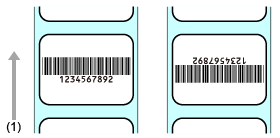
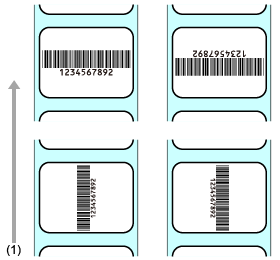
Readable Barcode Orientations
|
|
|
|
|
Place the barcode within the size of the visual field. Do a test read carefully in advance.
|
Recommended Barcode Sizes
|
|
Narrow bar: 0.25 mm (0.01") or greater
|
•
|
609 dpi ( CL4NXonly): 6 dots or more
|
Refer to the specifications of each barcode checker.
|
|
|
Cell size: 0.25 mm (0.01") or greater
|
•
|
609 dpi ( CL4NXonly): 6 dots or more
|
Refer to the specifications of each barcode checker.
The size of the visual field conforms to the specifications of the barcode checker.
|
Available Code Formats
The barcode check function supports the following code formats. Check the specifications of the barcode checker to ensure compatibility with the available code types.
|
|
|
|
|
GS1 DataBar Omnidirectional
GS1 DataBar Stacked Omnidirectional
GS1 DataBar Expanded Stacked
|
|
|
|
|
|
|
|
|
|
•
|
To use the comparison mode, create barcodes by using barcode commands. If a barcode such as graphic data (BMP image, etc.) or a preprinted barcode is placed within the barcode readable area, this mode may not function correctly.
|
|
|
|
|
•
|
In readable mode, you can include barcodes that are not created by barcode commands (such as graphic data or preprinted barcodes) as the check target. To do this, select [Setting]in [Set No. of Barcodes], and specify the number of barcodes per label in [Barcodes per Label]. However, there may be a case that those barcodes cannot be read by scanners thus this mode does not function correctly.
|
|
[02-01466-EN]