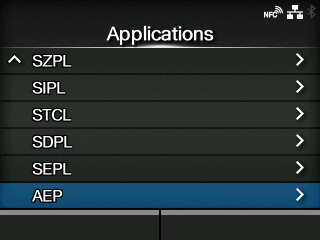
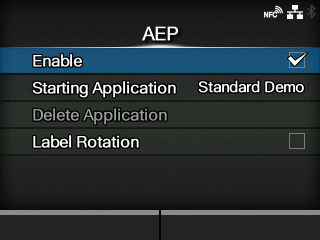
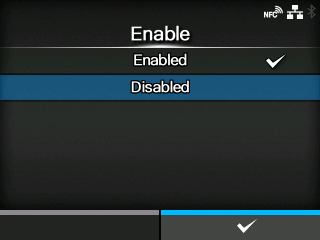
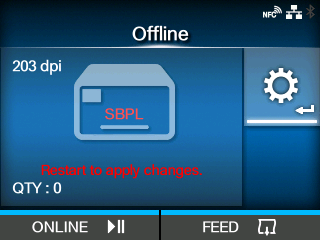
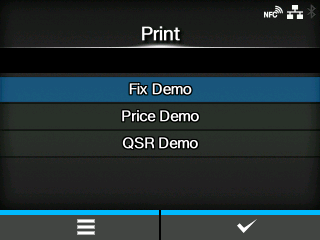
CL-NX Fix Demo, Price Demo, and QSR Demo appear Miho 15 May 2026 14:03 Updated The topics here explain what to do when the following screen appears after you power on the product. This screen appears when the AEP (Application Enabled Printing) function is enabled. To return to the normal mode, disable the AEP function by following the steps below. 1. Press thebutton to change to Offline mode. 2. Press thebutton to show the[Settings]menu. 3. Select[Applications]using the/buttons, and then press thebutton. 4. Select[AEP]using the/buttons, and then press thebutton. 5. Select[Enable]using the/buttons, and then press thebutton. 6. Select[Disabled]using the/buttons, and then press thebutton to confirm. 7. Press thebutton. The Offline screen appears. 8. Reboot the product. The product returns to the normal mode. Contact your SATO technical support if the error cannot be resolved.[02-01596-EN]

 button to change to Offline mode.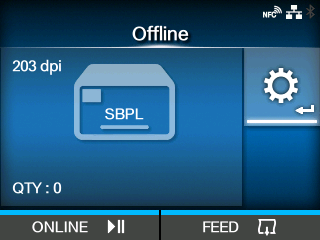
 button to show the
 /
/ buttons, and then press the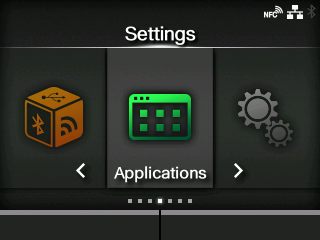
 /
/ buttons, and then press the