Applicable models: CL4/6NX
Set detailed sensor operation and print motion.
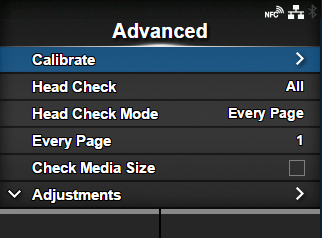
The setting items are as follows:
Check if there is a broken element of the print head.
Set the mode for head check.
|
◦
|
Appears if you have selected [All] or [Barcode] in the [Head Check] menu.
|
Set the interval for head check.
|
◦
|
Appears if you have selected [Every Page] in the [Head Check Mode] menu.
|
Enable or disable media size check.
|
◦
|
Appears if you have selected [Gap] or [I-Mark] in the [Sensor Type] menu.
|
Correct the offset value, print position and print darkness.
Set whether to power on the product in Online mode.
Set whether to automatically feed the media when recovering from an error.
Set whether to automatically feed the media when the product is powered on.
Set the length to feed after printing.
Select the sensor for sensing the paper end.
Set the edge position for printing.
For product settings, set whether to prioritize the settings that are done through the product or through commands.
Enable or disable the reprint function.
Adjust the media stop position or cut position when
[Sensor Type] is set to
[None].
Enable or disable the warning when the media is about to run out.
*This feature is supported on products from serial number 6B~ and above. Although this setting appears on products with serial number 6A~ or below, it is not supported.
[02-03264-EN]