Applicable models: CL4NX/6NX
Please refer to the below.
|
|
|
•
|
After doing the settings, press the  button to enable the new settings. Press the  button to cancel the new settings and return to the previous settings.
|
|
|
|
|
•
|
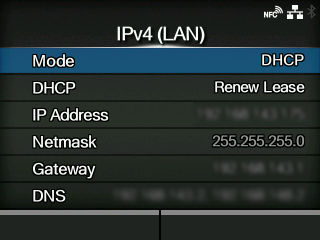
You cannot change [IP Address], [Netmask], [Gateway], or [DNS]when [Mode]is [DHCP].
|
|
The setting items are as follows:
Select the IP address assignment method.
Update the lease time and get the IP address from the DHCP server again.
|
◦
|
Appears only if you have selected [DHCP]in the [Mode]menu and LAN is the active interface.
|
|
◦
|
Does not appear if the wireless LAN is the active interface.
|
Set and check the IP address.
If you have selected
[DHCP]in the
[Mode]menu, the screen shows the IP address you received from the DHCP server.
If you have selected
[Static]in the
[Mode]menu, select this to set the IP address.
Set and check the subnet mask address.
If you have selected
[DHCP]in the
[Mode]menu, the screen shows the subnet mask address you received from the DHCP server.
If you have selected
[Static]in the
[Mode]menu, select this to set the subnet mask address.
Set and check the default gateway address.
If you have selected
[DHCP]in the
[Mode]menu, the screen shows the gateway address you received from the DHCP server.
If you have selected
[Static]in the
[Mode]menu, select this to set the default gateway address.
Set and check DNS server addresses.
If you have selected
[Static]in the
[Mode]menu, select this to set and check DNS server addresses.
[03-01295-EN]