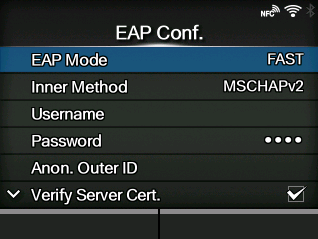
CL-NX [EAP Conf.] Miho 15 May 2026 11:22 Updated Set the functions for EAP. Appears only if you have selected items other than[Personal (PSK)]in the[WPA Authentication]menu or if you have selected[Dynamic WEP]in the[Security]menu. The setting items are as follows: EAP Mode Set the EAP Mode (authentication mode). Inner Method Set the inner method. ◦ Appears only if you have selected[FAST],[PEAP], or[TTLS]in the[EAP Mode]menu. Username Set the user name. Password Set the password. Anon. Outer ID Set the external ID. ◦ Appears only if you have selected[FAST],[PEAP], or[TTLS]in the[EAP Mode]menu. Verify Server Cert. Enable or disable server authentication. ◦ Appears if you have selected anything other than[LEAP]in the[EAP Mode]menu. Private Key P/W Set the Private Key password. ◦ Appears only if you have selected[TLS]in either the[EAP Mode]menu or[Inner Method]menu. PAC Auto Provisioning Enable or disable PAC Auto Provisioning. ◦ Appears only if you have selected[FAST]in the[EAP Mode]menu. PAC P/W Set the PAC password. ◦ Appears only if you have selected[FAST]in the[EAP Mode]menu and if you have selected[Disabled]in[PAC Auto Provisioning]. [03-01344-EN]