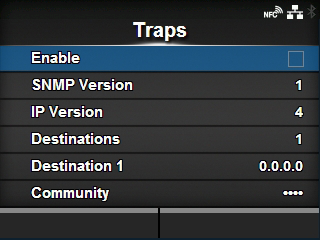
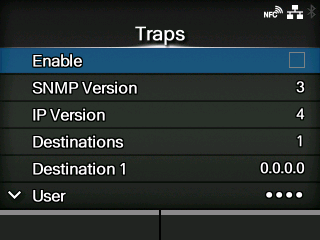
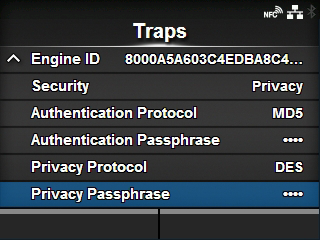
CL-NX [Traps] Miho 15 May 2026 11:21 Updated If[SNMP Version]is[1] If[SNMP Version]is[3] If[Security]is[Privacy] Set the Traps function. The setting items are as follows: Enable Enable the Traps function. SNMP Version Set the SNMP version. IP Version Set the IP version to use for trap destinations. Destinations Set the number of trap destinations. Destination 1 Set address 1 for the trap destination. Destination 2 Set address 2 for the trap destination. ◦ Appears only if you have selected[2]or[3]in the[Destinations]menu. Destination 3 Set address 3 for the trap destination. ◦ Appears only if you have selected[3]in the[Destinations]menu. Community Set the Traps community name. ◦ Appears only if you have selected[1]or[2c]in the[SNMP Version]menu. User Set the Traps user name. ◦ Appears only if you have selected[3]in the[SNMP Version]menu. Engine ID Set the engine ID. ◦ Appears only if you have selected[3]in the[SNMP Version]menu. Security Set the security level. ◦ Appears only if you have selected[3]in the[SNMP Version]menu. Authentication Protocol Set the authentication protocol. ◦ Appears only if you have selected[Authentication]or[Privacy]in the[Security]menu. Authentication Passphrase Set the authentication passphrase. ◦ Appears only if you have selected[Authentication]or[Privacy]in the[Security]menu. Privacy Protocol Set the privacy protocol. ◦ Appears only if you have selected[Privacy]in the[Security]menu. Privacy Passphrase Set the privacy passphrase. ◦ Appears only if you have selected[Privacy]in the[Security]menu. [03-01396-EN]