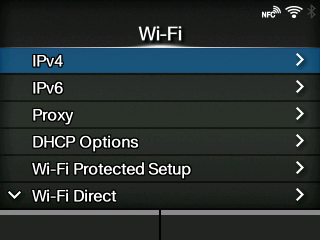
CL-NX [Wi-Fi] Miho 16 May 2026 09:50 Updated Set the wireless LAN. Appears only if you have installed the optional wireless LAN. • After doing the settings, press thebutton to enable the new settings. Press thebutton to cancel the new settings and return to the previous settings. • When[Wi-Fi Direct]is active,[IPv6]and[Wi-Fi Protected Setup]do not appear on the screen. The setting items are as follows: IPv4 Configure IPv4 for Wi-Fi. IPv6 Configure IPv6 for Wi-Fi. Proxy Configure the proxy for Wi-Fi. DHCP Options Configure the DHCP options for Wi-Fi. Wi-Fi Protected Setup Set the wireless LAN connection with the Wi-Fi Protected Setup (WPS) function. Wi-Fi Direct Set the Wi-Fi Direct function. ◦ Enabled only if you have selected[Infrastructure]in the[Mode]menu. Band Set the band. ◦ Enabled only if you have selected[Infrastructure]in the[Mode]menu. SSID Set the SSID. Hidden SSID Set the hidden SSID. ◦ Appears only if you have selected[Infrastructure]in the[Mode]menu. Mode Set the communication mode. Channel Set the communication channel. Security Set the security (encryption method). WEP Conf. Set the WEP key. ◦ Appears only if you have selected[WEP]in the[Security]menu. WPA Conf. Set the WPA authentication. ◦ Appears only if you have selected[WPA2/WPA]or[WPA2]in the[Security]menu. EAP Conf. Set the EAP authentication. ◦ Appears only if you have selected[Dynamic WEP]in the[Security]menu. [03-01311-EN]
 button to enable the new settings. Press the
 button to cancel the new settings and return to the previous settings.