Applicable models: CL4NX/6NX
Please refer to the below.
Set the head pressure according to the media thickness, including the liner.
|
1.
|
Open the top cover of the product.
|
|
2.
|
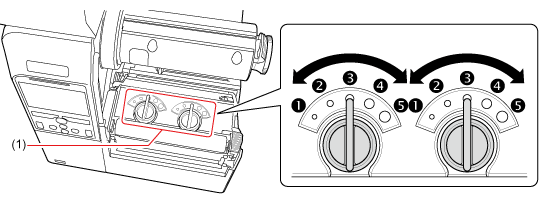
Find the adjustment dials (1) on the top of the print head assembly.
|
|
3.
|
Turn the adjustment dials (1) according to the media thickness and set the head pressure.
|
Media Thickness (mm (inch))
|
0.060 - 0.200 (0.0024" - 0.0079")
|
0.200 - 0.268 (0.0079" - 0.011")
|
|
|
 (Left and Right,CL4NXonly) (Left and Right,CL4NXonly)to (Left and Right,CL6NXonly) (Left and Right,CL6NXonly)
|
to
|
|
|
Thin paper/normal label, etc.
|
|
|
|
|
•
|
The factory default settings of both Left and Right dials are.
|
|
•
|
ForCL6NXdispenser model, the factory default settings of both Left and Right dials are.
|
|
•
|
The thickness of the media includes the liner.
|
|
After adjusting the head pressure, perform actual printing and if media feeding starts to shift to the right side when facing the product, adjust the pressure balance referring to the Pressure Balance Setting. [03-01529-EN]