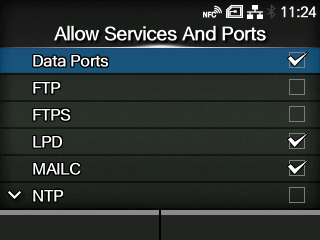
Applicable models: CL4/6NX
Set the service or port to allow communication.
Available only if you have selected
[Enabled] in the
[Enable] menu.
 |
• The product becomes accessible only through services or ports that are allowed in [Allow Services And Ports]. |
The setting items are as follows:
Enable or disable access through data ports.
Enable or disable the functions for FTP.
The setting changes in conjunction with
[Enable] in the
[FTP] menu.
Enable or disable the LPD function.
The setting changes in conjunction with
[Enable] in the
[LPD] menu.
When using the AEP (Application Enabled Printing) function, enable or disable port access for the product's internal e-mail client function.
Enable or disable the functions for NTP.
The setting changes in conjunction with
[Enable] in the
[NTP] menu.
Selects the mode for SOS or disable SOS.
The setting changes in conjunction with
[SOS Mode].
Enable or disable PING access.
Enable or disable use of proxy with LAN or wireless LAN.
The setting changes in conjunction with
[Enabled] in the
[LAN] >
[Proxy] or
[Wi-Fi] >
[Proxy] menu.
To set to
[Enabled], the
[Server] and
[Exclude] menus in the
[LAN] >
[Proxy] or
[Wi-Fi] >
[Proxy] menu should be set.
 |
A message prompting you to restart the product will appear on the Online/Offline screen if you have made any changes. In such a case, reboot the product to apply the settings.
|
Enable or disable the access from SATO All-In-One Tool.
When using the AEP (Application Enabled Printing) function, enable or disable port access for the SCP client function.
Enable or disable the SNMP Agent function.
The setting changes in conjunction with
[Enable] in the
[Agent] menu.
When using the AEP (Application Enabled Printing) function, enable or disable port access for the Web client function.
Enable or disable access to the web configuration page.
The below table shows the packet filtering setting for each allowed services and port setting.
*The values may vary depending on other settings.
|
• When [Proxy] is enabled, the port number set in the [Port No.] menu under [LAN] > [Proxy] or [Wi-Fi] > [Proxy] is allowed for communication. |
[03-02277-EN]