Applicable models: CL4NX/6NX
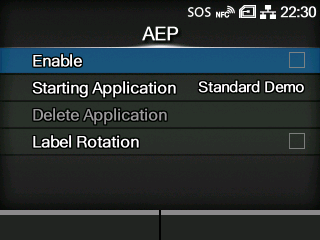
Set the functions for AEP (Application Enabled Printing).
AEP mode allows you to use the product as a stand-alone printer by running applications within the product.
Use the standard application, or install custom applications to the product from a USB memory, All-In-One Tool, WebConfig page, etc.
In AEP mode, you can use USB keyboards and barcode scanners to input data.
The setting items are as follows:
Enable or disable AEP mode.
Select the application to start at product startup in AEP mode.
Delete installed applications.
Set whether to rotate the page orientation for label printing.
|
|
|
•
|
Contact your SATO sales representative for more information about the use of AEP mode.
|
|
[03-02497-EN]