Applicable models: CL4NX/6NX
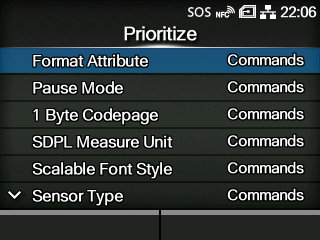
Select the settings to be prioritized for each setting item of the SDPL command. You can set whether to prioritize settings that are done through the product or through commands.
When you select
[Settings] for an item, the setting specified in the
[SDPL] menu of the product will be used.
The setting items are as follows:
Select the setting to be prioritized for the format attribute.
Select the setting to be prioritized for pause mode.
Select the setting to be prioritized for the 1 byte code page.
Select the setting to be prioritized for the measurement unit.
Select the setting to be prioritized for the scalable font style.
Select the setting to be prioritized for the sensor type.
Select the setting to be prioritized for the feedback character.
Select the setting to be prioritized for the SOH commands.
Select the setting to be prioritized for the module selection.
The option selected in the
[Printing] >
[Advanced] >
[Prioritize] menu is applied to these three settings and shown on this screen.
[03-02466-EN]