Applicable models: CL4NX/6NX
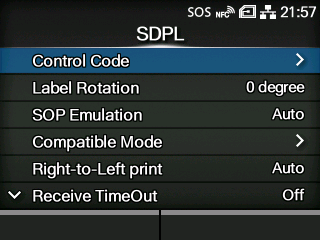
To use SDPL as a printer command, set the following items:
Set the page orientation for label printing.
Set the compatible mode for SDPL.
Set the Right-to-Left printing function.
Set a period of time the product stays in binary data receiving mode.
Set whether to feed a label with nothing printed on it when the product receives label formatting commands that do not generate any printable image.
Select the settings to be prioritized for the SDPL command.
Set the format attribute.
Enable or disable the pause mode.
Select the code page to be used for one-byte characters.
Set the measurement unit.
Set the style of the scalable fonts.
Enable or disable the <STX>a command.
Select where to save the product settings.
|
|
|
•
|
[Format Attribute], [Pause Mode], [1 Byte Codepage], [SDPL Measure Unit], [Scalable Font Style], [Feedback Character], [SOH Commands] and [Module Selection] are available only if [Settings] is selected for the corresponding setting item under the [Prioritize] menu.
|
|
[03-02450-EN]