Applicable models: CL4NX/6NX
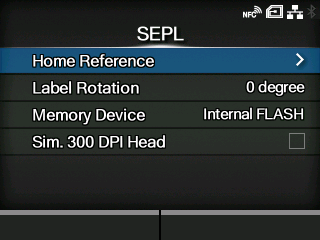
To use SEPL as a printer command, set the following items:
Adjust the print reference position by specifying the offset position in the horizontal and vertical directions.
Set the page orientation for label printing.
Select the product's memory space in which to store forms, graphics and fonts.
When you are using the product with 305 dpi resolution, enable or disable 300 dpi simulation mode.
[03-02490-EN]