
Problem/Question
Label prints misaligned when printing using SZPL.
Applicable To
CL4NX / CL6NX Plus
Resolution/Answer
Option 1 - This will only be applicable to SZPL printing.
[Settings] Menu > [Applications] Menu > [SZPL] > [Label]
Set the print position.
The setting items are as follows:
Shift
Set the shift offset position of the label.
Top
Set the top offset position of the label.
Option 2 - This will apply to ALL emulation.
[Settings] Menu > [Printing] Menu > [Imaging]
Set the print reference position in the vertical and horizontal directions.
The setting items are as follows:
Vertical
Adjust the print position in the vertical (feed) direction.
Horizontal
Adjust the print position in the horizontal direction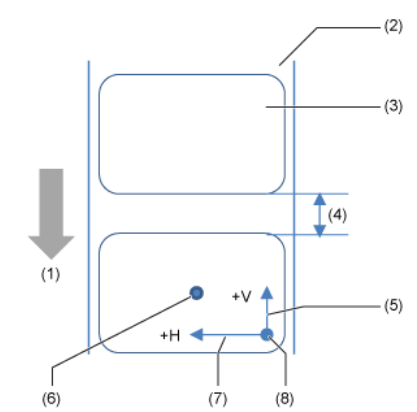
(1) Feed direction
(2) Liner
(3) Label
(4) Gap between labels
(5) Adjustment of vertical base reference point
(6) Base reference point after adjustment
(7) Adjustment of horizontal base reference point
(8) Print reference position
03-80280-EN