
Applicable models : CL4/6-SXR
Please refer to a below.
If printing is not possible because the print head is worn or damaged, replace it according to the following procedure:
You can also check the procedure in the video.
- CL4-SXR Print head replacement
- CL6-SXR Print head replacement

- Wear gloves when touching the print head. Touching the edge of the print head with your bare hand could cause injury or damage the print head.
When replacing the print head, make sure that the product is powered off, and disconnect the power cord from the outlet.
 |
Do not operate the power supply, or connect or disconnect the power cord while your hands are wet. Doing so could cause an electric shock. |
-
Press the head lock lever backward, then open the head assembly.
- The print head and its surroundings are hot after printing. Wait until the product cools down.
- Press the lever to the left to unlock the print head.
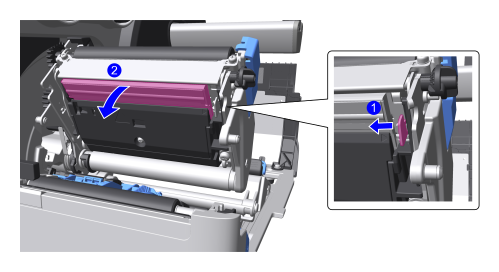
- Take out the print head.
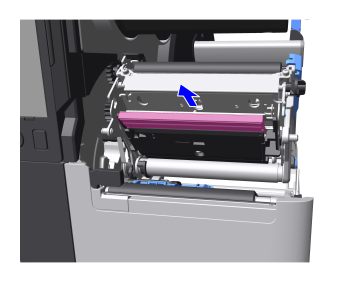
-
Remove the connectors from the print head.
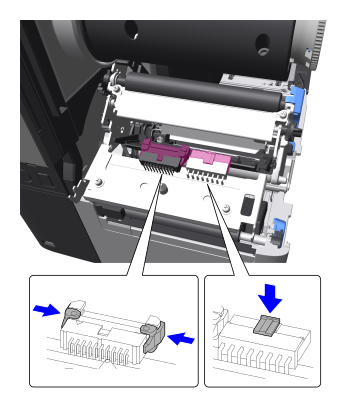

There are two connectors on the CL4-SXR and three connectors on the CL6-SXR. -
Insert the connectors on the product into the new print head connectors until they "click" into place.

Be careful not to damage the surface of the print head. 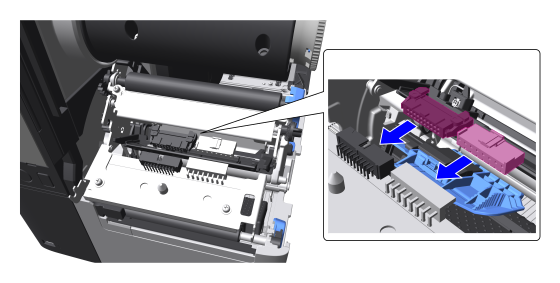
- Insert the print head along the left and right guides all the way in.
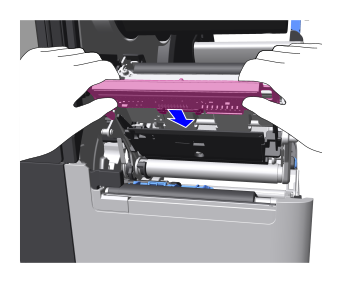
-
Press the print head in until it "clicks" and locks into place.
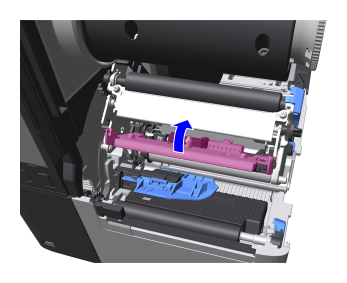
[01-03341-EN]