
 あ
あ
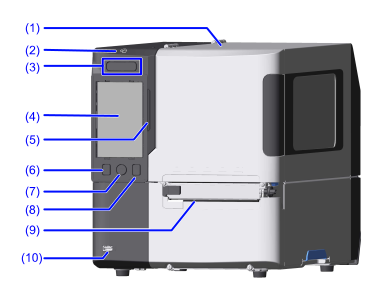
- Top cover
Open this cover when replacing consumables or cleaning the product. - NFC antenna location
When communicating with an NFC-enabled mobile device, hold the mobile device here. -
 Power button
To power on the product, press the button until the LED indicator lights blue.
To power off the product, press the button for more than 2 seconds, and then tap [Power off]. The LED indicator lights red, then turns off and the power is turned off.
-
Touch Panel
Shows the status of the product, error messages, menu items, and more. The display is operated by touching it with your finger.
- Do not operate the display with pointed or sharped objects such as mechanical pencils or ballpoint pens. Doing so could damage the display or result in electric shock.
- LED Indicator
Indicates the current status of the product. -
 Online/Offline button
Switches between Online mode and Offline mode. -
 Home button
Move to the Home Screen.
For more information on the Home Screen, see Displays and Operations in the Home Screen. -
 Feed button
Feeds the media. - Media discharge outlet
Discharges the printed media. -
USB connector (Type A)
Connect USB devices, like a USB memory, scanner, or keyboard.
- Use a USB memory whose volume label contains only single-byte alphanumeric characters. Volume labels with double-byte characters are not supported.
- Connection via a USB hub is not supported.
- Format the USB memory in FAT32 before use.
[01-03344-EN]