
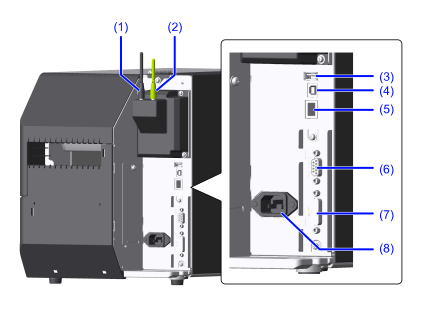
- SIM communication unit (
 option)
This unit is needed to use SIM communications (cellular) for the SOS (SATO Online Services) function. Use the black antenna. - Wireless LAN/Bluetooth unit (option)
This unit is needed to use wireless LAN and Bluetooth. Use the green antenna. - USB connector (Type A)
Connect USB devices, like a USB memory, scanner, or keyboard. - USB connector (Type B)
Connect USB cables. To connect the product to the computer using the USB interface. - LAN connector
Connect LAN cables. RS-232C connector (
option,  standard equipment)
Connect RS-232C cables. To connect the product to the computer using the RS-232C serial interface.
Also, a scanner can be connected.
- Printing using the USB serial conversion cable is not guaranteed, so be sure to use the recommended RS-232C cable.
- To connect and use a scanner, you must change the setting to [RS-232C] in [Printing] > [Advanced] > [Barcode Checker] > [Interface].
- EXT connector ( option, standard equipment)
Connect a cable for external signals. Used to connect an external device to the product. AC input terminal
Connect the power cord.
- When connecting the power cord, be sure to connect the ground wire to the ground terminal. Electric shock could occur if you do not.
[01-01658-EN]