Las siguientes páginas han sido traducidas por un sistema de traducción automática.
Tenga en cuenta que los sistemas de traducción automática no son correctos al 100%.
Es posible que algunas palabras, incluyendo nombres propios, estén traducidas de forma incorrecta.
Can I clone printer settings?
Yes, you can clone configuration settings from one printer to another by selecting "Clone Configuration" in the app. Please refer Here, or follow the steps below:
Users can clone printer-specific settings from one printer to another printer of the same series, thus saving time in printer configuration. This is useful when you are setting up multiple printers with the same settings.
|
|
|
•
|
This feature is not available for WT4-AXB series (International Model) printers.
|
|
•
|
You need to connect the printer before you can create or apply the clone configuration file.
|
|
•
|
You can only use TCP/IP (for printers connected via LAN or Wi-Fi) or Bluetooth (Android device only) interface for cloning configuration.
|
|
|
1.
|
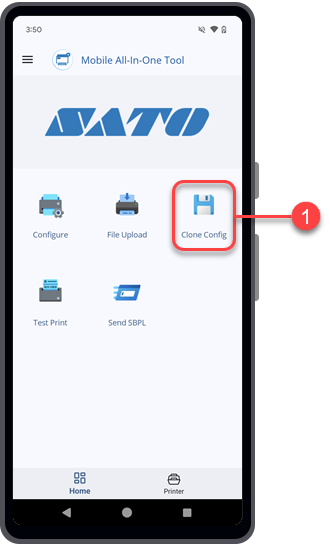
On the Home page, tap the [Clone Config] icon.
|
The
[Clone Configuration] screen opens, showing the
[Select Printer Interface] dialog.
|
2.
|
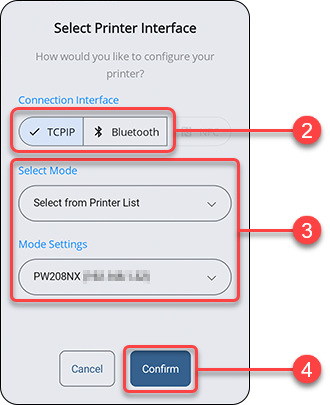
Select one of the [Connection Interface] options.
|
The available interface options are as follows:
|
◦
|
[TCPIP] (For printers connected via LAN or Wi-Fi)
|
|
◦
|
[Bluetooth] (Android device only)
|
|
3.
|
Set the [Select Mode] and [Mode Settings] options, or the [Select a printer] option.
|
Tap the drop-down list to select the options or tap on the text box if prompted, to enter the address.
|
|
|
•
|
If you selected [Bluetooth], you need to pair the printer with your Android device before you can select the printer from the paired device list.
|
|
If the TCP/IP or Bluetooth connection is valid and the printer is connected, the
[Select Printer Interface] dialog closes and shows the
[Clone Configuration] screen.
|
|
|
•
|
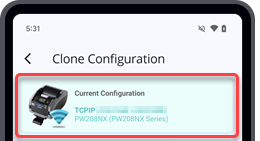
If you want to connect another printer or change the interface connection, tap the [Current Configuration] bar at the top of the screen.
|
The [Select Printer Interface] dialog is shown for configuration.
|
|
5.
|
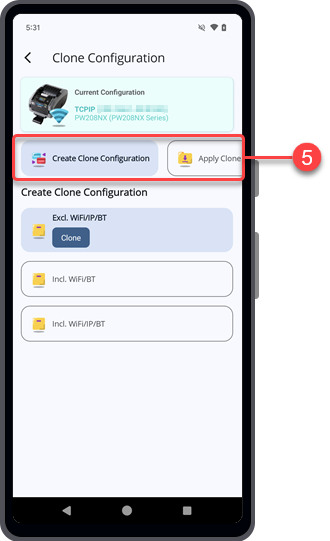
On the [Clone Configuration] screen, you can choose to create a clone configuration file or apply the desired clone configuration file.
|
Continue with the following procedures according to the selected option.
[04-80129-EN]