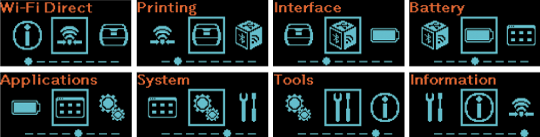
PW2NX Settings Mode Menu Miho 09 January 2025 08:20 Updated Applicable models: PW208NX Please refer to the below. You can configure the various settings for the product in the settings mode. The following main menus are available in the settings mode. Main menu Description Wi-Fi Direct Menu You can configure the Wi-Fi Direct function. This menu only appears if the product is wireless LAN model. Printing Menu You can configure the settings related to printing. Interface Menu You can configure the settings related to the interface. Battery Menu You can change the battery settings and/or check the battery status. Applications Menu You can configure the settings related to the printer commands. System Menu You can change the settings related to the display, notification and buzzer sound functions. Tools Menu You can perform operations such as test printing and reset, or change other settings. Information Menu You can check the information about this product. [03-00206-EN] sato-pw2nx-manual-german.pdf 2 MB Download sato-pw2nx-manual-french.pdf 2 MB Download sato-pw2nx-manual-dutch.pdf 2 MB Download sato-pw2nx-manual-polish.pdf 2 MB Download